Delete your account
Updated 2026-11-13
You can request deletion of your Kaki Gaming account at any time. Before you do, remember: when the account is removed, any KAKI, K POINT and earnings you have not withdrawn are forfeited and can't be used, withdrawn or refunded after that — use or withdraw what you want to keep first. A subscription bought through the App Store or Google Play keeps renewing until you cancel it in the store; a card subscription is cancelled for you.
How to request deletion
1. Open Settings
Go to Settings, open the Account tab and choose Delete Account.
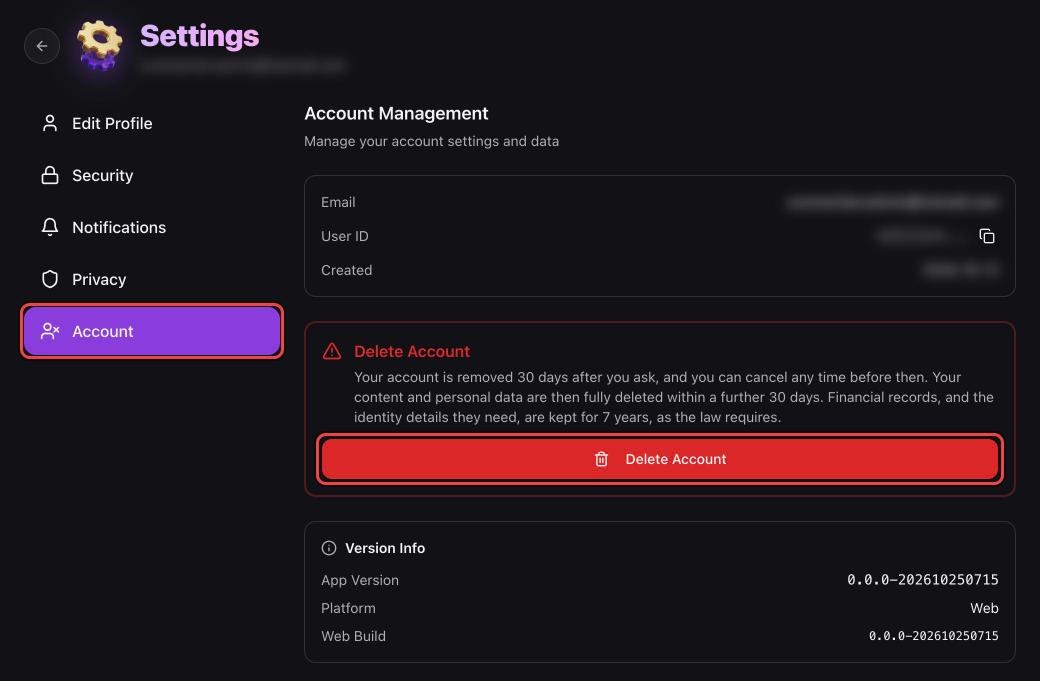
2. Type DELETE to confirm
Read what happens, choose a reason if you like (it is optional), type DELETE and tap Request deletion (if your app version asks for your account email instead, type that). Guild owners must transfer or disband their guild before the request is accepted.
3. 30-day deletion period
Your account is removed 30 days after you ask. Orders that have not started are cancelled and refunded, and your profile stops taking bookings; orders, rides and withdrawals already under way have to finish first. Settings → Account shows the removal date, and until then you can sign in and tap Cancel Deletion. To skip the wait, tap Delete now in the same place (you may be asked to sign in again).
After deletion
Once your account is removed you can't sign in to it again; signing up later with the same email, Apple or Google account gives you a new, empty account. Your content and personal data are fully deleted within a further 30 days. Records of top-ups, purchases, orders and their chats, refunds, withdrawals and rewards are kept for 7 years, as the law requires — see the Privacy Policy for details.